Skip to content
Clinic staff management software

Clinic staff management software. From rota to earnings.

Manage staff rotas, approved timesheets, hourly earnings and practitioner splits in one place. Every statement explains the final amount before your clinic approves payment.
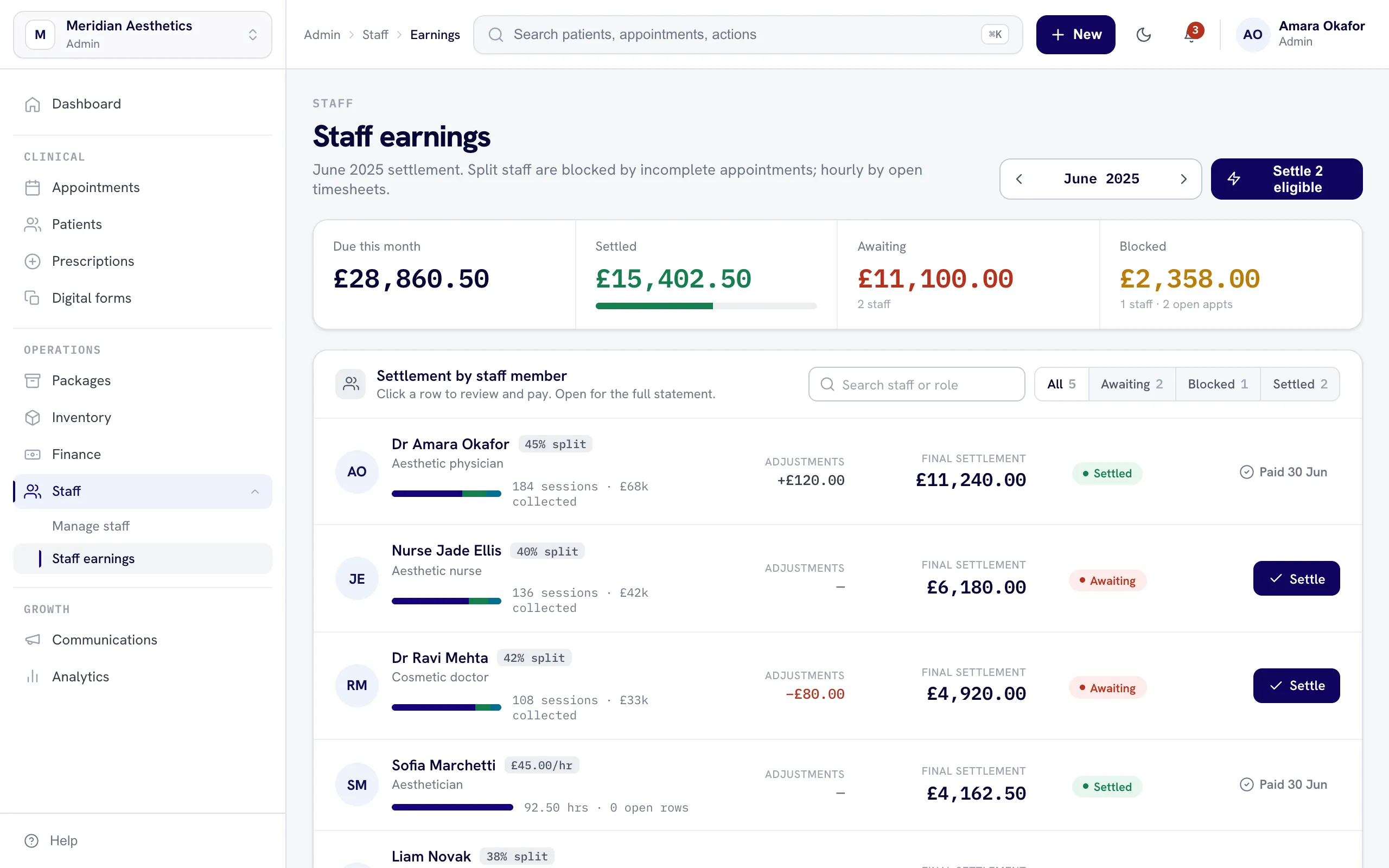
The nuemed staff earnings and commission dashboard
How staff earnings work

Calculate clearly. Pay with approval.

nuemed prepares the figures and the clinic stays in control of every payment.

1Choose how they earnSet each person as hourly or split-based, with your own VAT and consultation rules.
2Review the statementApprove timesheets and check every earning, discount, refund and clawback.
3Approve and payThe clinic authorises the open-banking payment. nuemed then marks it as paid.
Staff management

Different agreements. One clear system.

Run hourly teams and split-based practitioners together, without forcing every staff member into the same pay structure.

Practitioner splitsSet a different revenue split for each practitioner and change it when their agreement changes.
Hourly timesheetsStaff submit their hours. An administrator reviews and approves them before earnings are generated.
Staff rotasPlan who is working and when, alongside the rest of your clinic operations.
Custom permissionsStart with role permissions, then give individual staff members more or less access when needed.
Before or after VATCalculate a split from revenue before VAT or after VAT, based on the practitioner agreement.
Consultation rulesChoose whether consultation revenue contributes to a practitioner's split.
Clear adjustmentsSee how refunds, discounts, VAT and clawbacks affect the final amount.
Approved paymentsReview the final earnings, authorise payment through open banking and keep the paid status recorded.
Staff earnings statements

Every figure explained.

Staff can see how their earnings were calculated, while administrators keep a complete record of approvals, adjustments and payments.

Where earnings came fromTrace split-based earnings back to the relevant treatments and consultations.
Hours by daySee the approved hours for each day and the hourly rate used in the calculation.
Monthly statementsGive each staff member a clear monthly breakdown of their clinic earnings and adjustments.

Part of one connected system.

Staff & pay questions, answered.

Yes. Each person can be set up as hourly or split-based. Approved timesheets generate hourly earnings, while practitioner splits are calculated from the relevant clinic revenue.

Yes. You can choose whether a practitioner split is calculated before VAT or after VAT, and whether consultations are included.

Staff enter their hours and an administrator approves the timesheet. The approved hours then feed into the staff earnings statement.

The statement explains where the earnings came from and shows hours, splits, VAT, discounts, refunds and any clawbacks that affect the final amount.

No. The clinic reviews the earnings and authorises the payment through open banking. Once sent, nuemed records the payment as paid.

No. nuemed calculates and records clinic staff earnings, but it does not calculate or file payroll taxes.

Yes. Clinics can use role-based permissions and adjust access for individual staff members when required.

Manage the team. Know every figure.

Get started
Chat with us